TEST 013
XERJ: ask your code a question instead of searching for a word
Short answer
XERJ indexes a project folder in seconds and lets you search it with a plain question. On my eight questions about one code project it handed back less than half the text grep did on the median (2.35 times less), though it returned more than grep on 2 of the 8. It usually finds the right file but often shows the top of it, so open the file and read the lines yourself.
XERJ is a code finder you run on your own computer. You point it at a project folder, it builds an index in a few seconds, and then you ask it a question like "where does the app set the session cookie?" instead of hunting for an exact word. It hands back five short snippets of code.
What it does
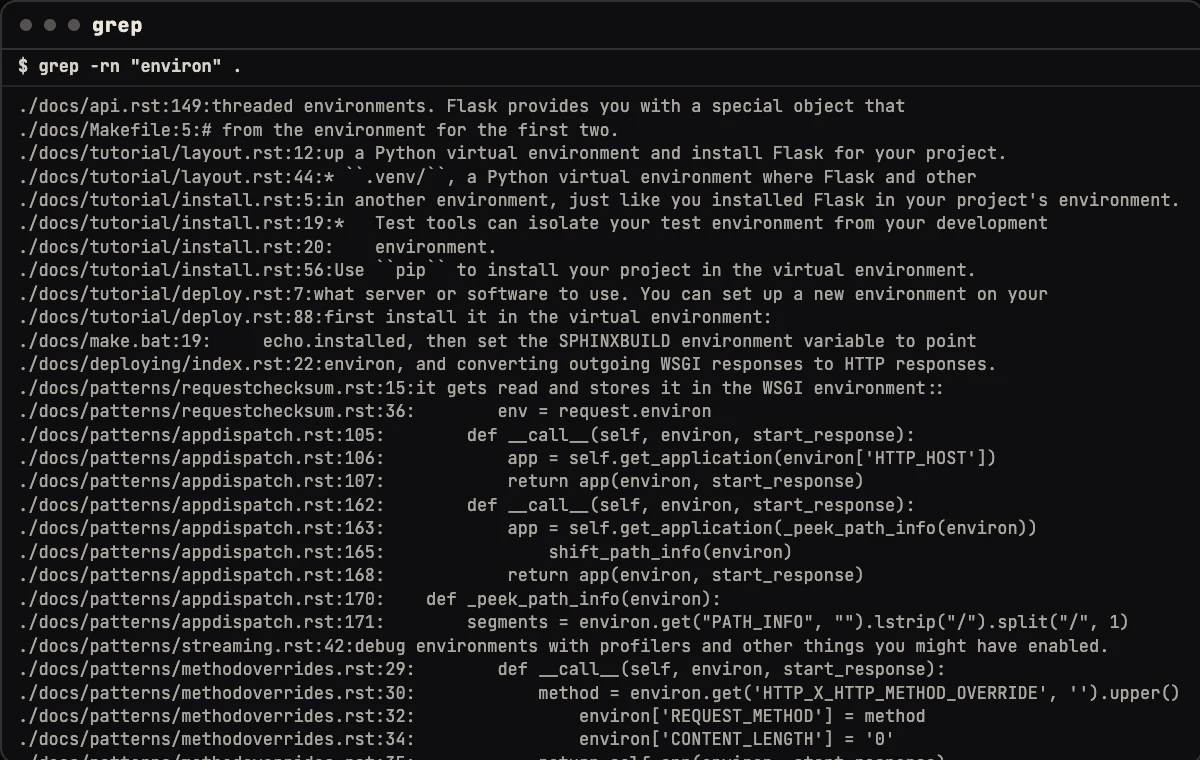
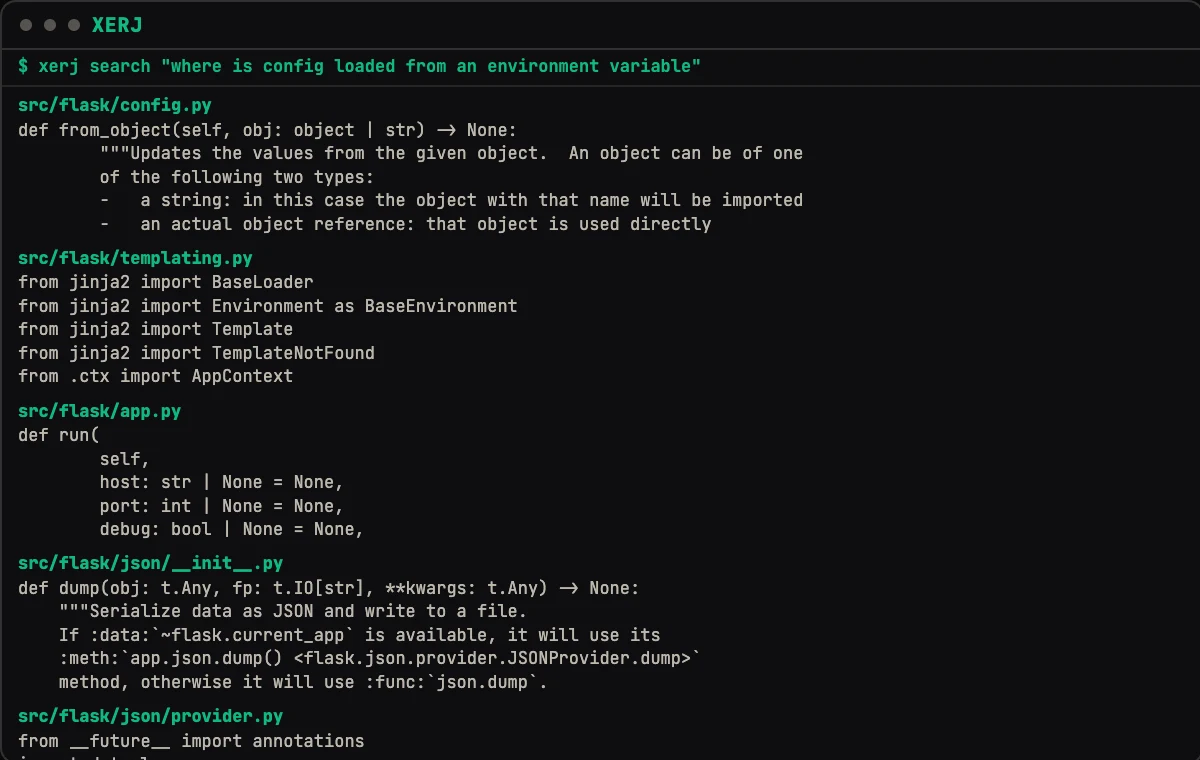
On a Mac, Claude Code finds things in your project with grep, a plain word search. Ask grep for one word and you get every line that has it, and all of that text goes back for Claude to read. XERJ answers a question with a few short snippets instead.
It helps most if you:
- use an AI coding agent on your own project and want less text coming back from each search
- have a big folder of code or notes you'd rather search by question
- are fine typing a few commands in Terminal
How to try it safely
Use the release download with its checksum. The checksum is a fingerprint of the file, so you can confirm you got exactly what the project published.
- Open the releases page (linked below) and download the file for your computer, plus its matching
.sha256file. - Check the fingerprint:
shasum -a 256 -con a Mac,sha256sum -con Linux, run on the.sha256file. It should print OK next to the download's name. - Extract the download. Inside is one program file; nothing else needs installing to run it.
- Start it on your own machine, in one Terminal window:
xerj --insecure --data-dir ./data - In a second window, index a folder:
xerj autoindex /path/to/your/project - Ask a question:
xerj search "where does the app set the session cookie"
xerj --insecure --data-dir ./data
xerj autoindex /path/to/your/project
xerj search "your question in plain words"
Two things to avoid:
- Do not paste the project's one-line installer (
curl ... | sh). It downloads a script and runs it in one go, so you never see what runs. The checksummed download lets you check the file first. - Do not point
--insecureat a network. It turns off passwords and encryption. Keep it on your own computer and stop it when you are done.
Same question, grep against XERJ
My eight questions
I indexed one open-source code project (Flask, 237 files) and asked eight questions about how it works. For each one I counted how much text came back from grep and from XERJ. The last two columns are a what-if: how much less text XERJ returned than opening every file grep points to, and where the right file landed in XERJ's results.
| Question | grep | XERJ | grep ÷ XERJ | Whole files ÷ XERJ | Right file's rank in XERJ |
|---|---|---|---|---|---|
| Where is the session cookie set? | 259 | 815 | 0.32 | 4.03 | 5 |
| How are blueprint URL prefixes added? | 1,905 | 870 | 2.19 | 17.82 | 4 |
| Where are error handlers looked up? | 1,198 | 719 | 1.67 | 48.47 | 1 |
| Where is config loaded from an environment variable? | 4,861 | 892 | 5.45 | 53.67 | 1 |
| Where do teardown functions run after a request? | 3,387 | 780 | 4.34 | 57.14 | 1 |
| Where are template context processors added? | 951 | 312 | 3.05 | 111.69 | 1 |
How does the flask command find the app? |
303 | 836 | 0.36 | 10.08 | 1 |
| Where is a dict turned into a JSON response? | 1,485 | 591 | 2.51 | 6.11 | 3 |
| Median | 2.35 | 33.1 |
Sizes are in tokens (the small chunks of text an AI reads), counted approximately. In plain words: on the median, XERJ handed back less than half of grep's text. The right file was in its top three results for 6 of the 8 questions, and in the top five for all 8. Each search took a fraction of a second.
The project's GitHub page says "40x fewer tokens than grep". That is its own description, not something I could match: on these questions the median was 2.35 times.
Things to take note of
- Open the file it points to. XERJ often shows the top of the right file, not the exact lines, so use it to find the place and then read the code there. On 2 of my 8 questions it also returned more text than grep.
- Keep the quick start on your own machine.
--insecurehas no password and no encryption; anyone who can reach it can read and delete every index. If your code must stay on your computer, leave the optional re-ranking off (it is off until you add a key). - It works best on private code. The project itself says it helps most on private, niche or very new code, the kind an AI hasn't already learned, and can be neutral or worse on popular public libraries. Flask is a popular library, so your numbers on private code may look different.
- The default search matches words, not meaning. A meaning-based mode is optional and downloads about 90 MB of model files.
- It is a release candidate (rc.95), not a 1.0 release. Expect commands and defaults to change, and check the README before you rely on it.
Read
- XERJ on GitHub: the README, for the install options, the settings and the project's own numbers
- The releases page, for the downloads and their
.sha256checksum files
Questions
What is XERJ in plain words?
A search tool you run on your own computer. You point it at a folder, it builds an index (a lookup list) in a few seconds, and then you search that folder by asking a question instead of typing an exact word.
Why not just use grep?
Grep is fine when you know the exact word. It hands back every line that has it, which can be a lot of text when an AI agent is doing the reading. XERJ hands back five short snippets instead.
Is it safe to run?
Run it the way this guide shows, on your own computer, from the checksummed download. Its quick-start mode has no password and no encryption, so anyone who can reach it can read and delete everything in it. It listens on your own machine only, unless you tell it otherwise.
Does it send my code anywhere?
Per the project's README, not by default. An optional re-ranking step sends the text of the top results to an outside service, and it stays off until you add a key.
Is it free?
The program is open source under Apache-2.0 and needs no key. The project asks users for a short write-up, such as a commit or pull request, in return for the free download.
Does it work inside Claude Code?
The project says it can plug into agents through MCP, a standard way to connect tools. This guide does not cover that setup, so follow the README for it.